A page for every job, and the employee page
Josiah, this is the next piece of work after the move to westernucg.com. Each job gets one page where the owner sees Austin's three-week look-ahead and the awarded subs get the current plans, without anyone making an account. The employee page gets the handbook and its forms.
The employee sign-in is the real, finished page. The rest are mockups, not a working app. Where I've guessed, the guess is listed at the end beside its question, so you can tell me where I got it wrong.
The cost is at the end: my estimate of the hours, billed as usual, with boxes to tick for what you'd like.
In the mockups, Jeff and Mike are real. The job, the owner, the subs, and every phone number and date are made up. Tap or click any picture to see it full size.
What you asked for
- A login for customers to see schedules, like Austin's three-week look-aheads.
- A login where subs can see the plans, probably tied to a Dropbox folder. Bidding already runs through PreconSuite, so this is for subs who've won work on a job.
- A login for employees, for W-2s, pay stubs and safety records.
Part 1
A page for every job
One page per job at an address of yours. The owner's people see the look-ahead and who to call. Awarded subs see the current plans. The job's PM sees who looked. Nothing goes to an owner or a sub unless someone at Western United presses a button that says what it sends.
What the owner sees
What the city's project manager would see on a public job. The look-ahead is Austin's own file, exactly as it's made today.
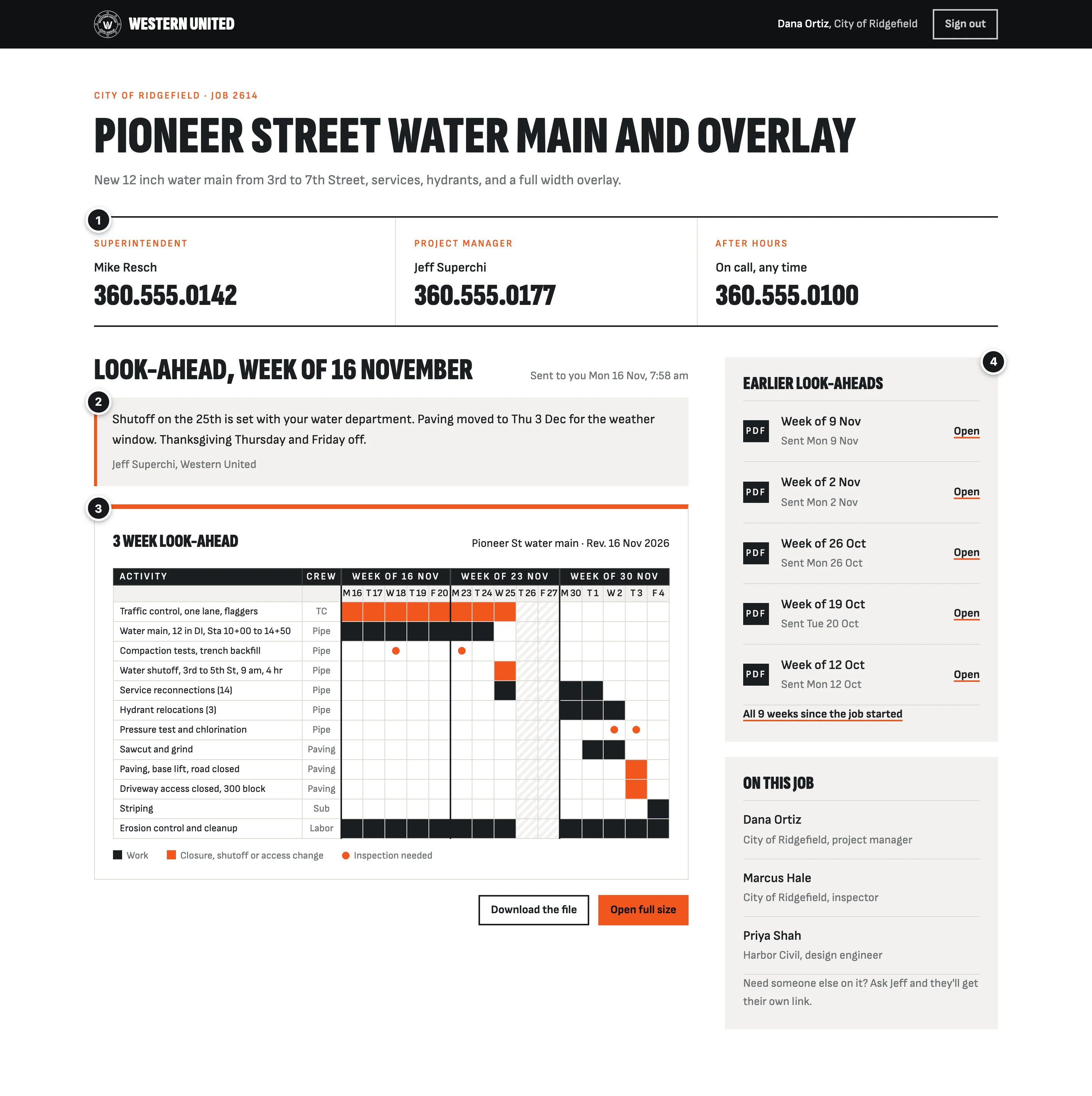
- 1Who to callThe superintendent, the PM, and an after-hours number, at the top, so nobody has to dig for them.
- 2A line from your PMWhat matters this week, in your PM's words, above the schedule.
- 3This week's look-aheadThe file Austin already makes, large enough to read in a truck. Nobody types it in again.
- 4Every earlier weekKept for the life of the job. When someone asks what you told them in March, it's one tap away.
The PM's side: when Austin's look-ahead comes in
Austin keeps making the look-aheads and saving each week's into the job's Dropbox folder, the way it's done now. Within a few minutes it's on the job page, and the PM who runs that job sees this: Brian, Jeff, Zack, or you on your own jobs. Anyone else at Western United you add sees it too, like Andy as the APM, the job's superintendent, or the office.
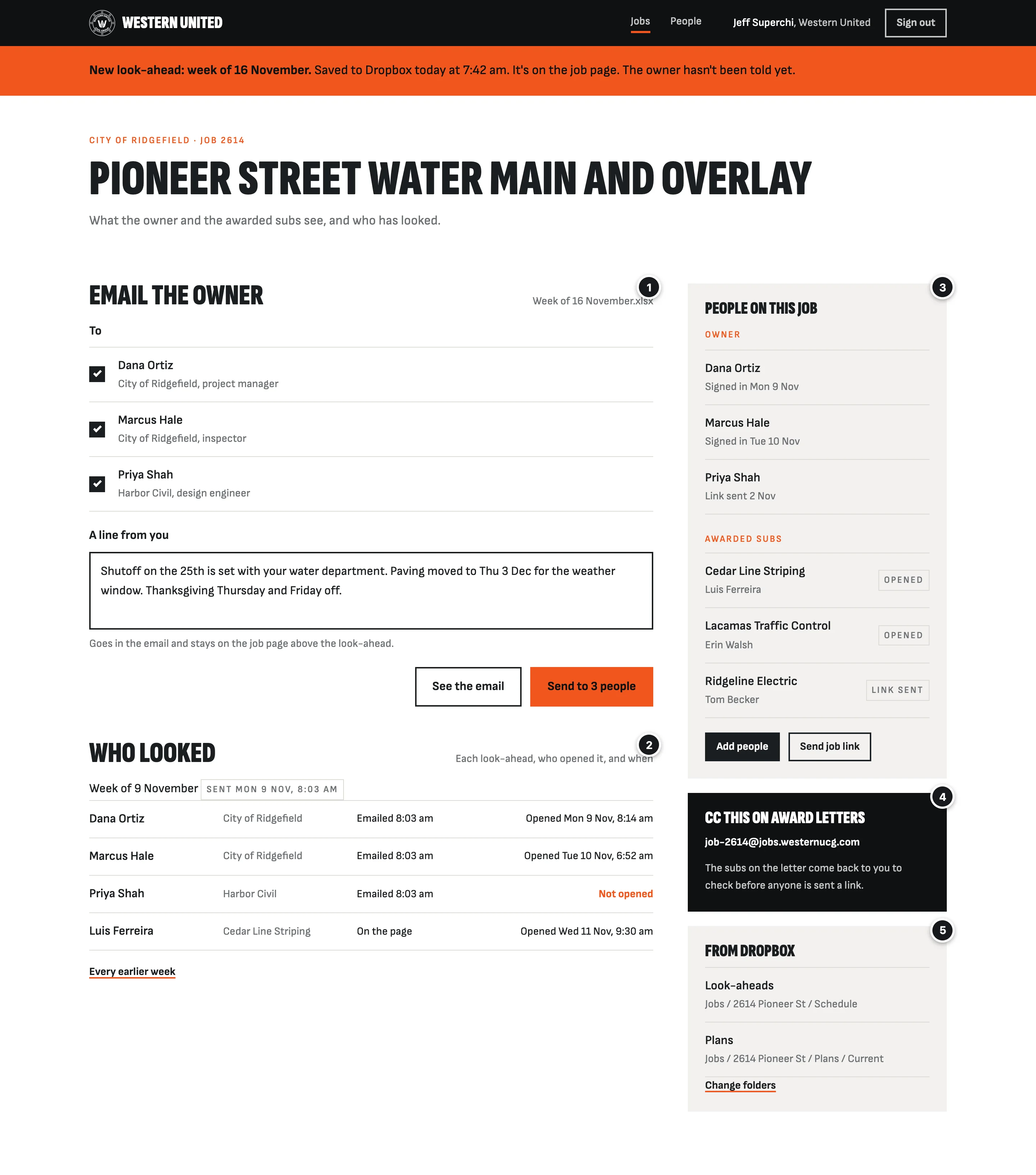
- 1Email the ownerThe PM adds a line and presses Send. It comes from a westernucg.com address with a link to the page. Nothing goes until someone presses it.
- 2Who lookedWho opened each look-ahead, and when. If an owner says nobody told them about Wednesday's shutoff, this answers it.
- 3People on the jobThe owner's people and the awarded subs. Adding an inspector takes seconds, and so does taking one off.
- 4The job's email addressAn optional shortcut for adding subs from an award letter. Next section.
- 5The Dropbox folders it readsPicked once, when the page is set up. Nothing in Dropbox moves.
Adding awarded subs
The plain way: the PM types a sub's email on the job page and presses Send job link. That always works, and on many jobs it may be all anyone uses.
The optional shortcut, for convenience: I assume your PM already emails an award letter. If they CC the job's address on it, the job page reads who the letter went to and emails the PM back, so nobody retypes the addresses. Nothing goes to the sub yet. If you want it, tick it in the cost section.
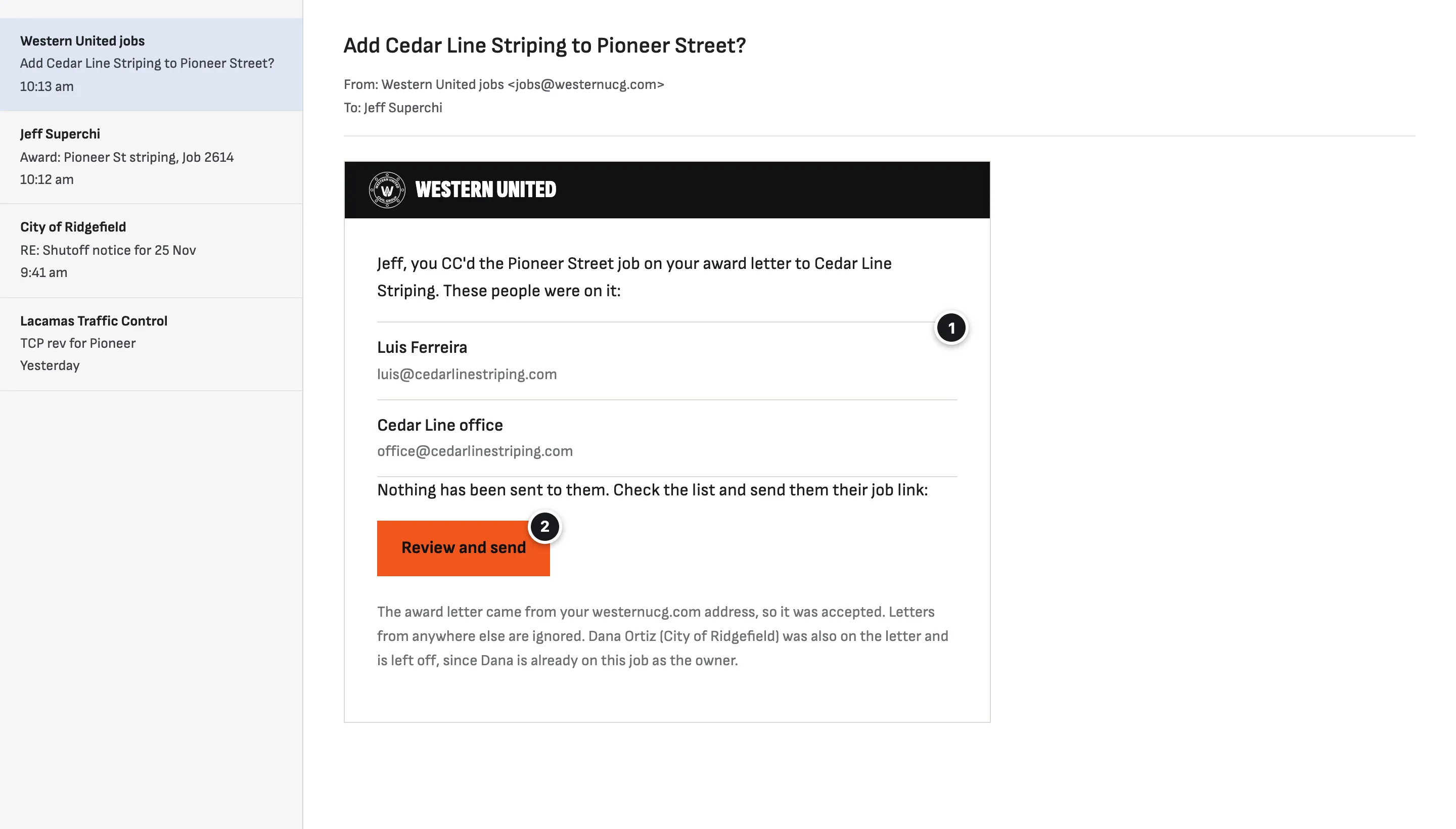
- 1Who was on the letterRead from the letter itself. Western United's own people and anyone already on the job are left off.
- 2Review and sendOpens a short page, below, rather than sending straight away. Email security filters open every link in a message, and a button that sent by itself would go off before your PM ever saw it.
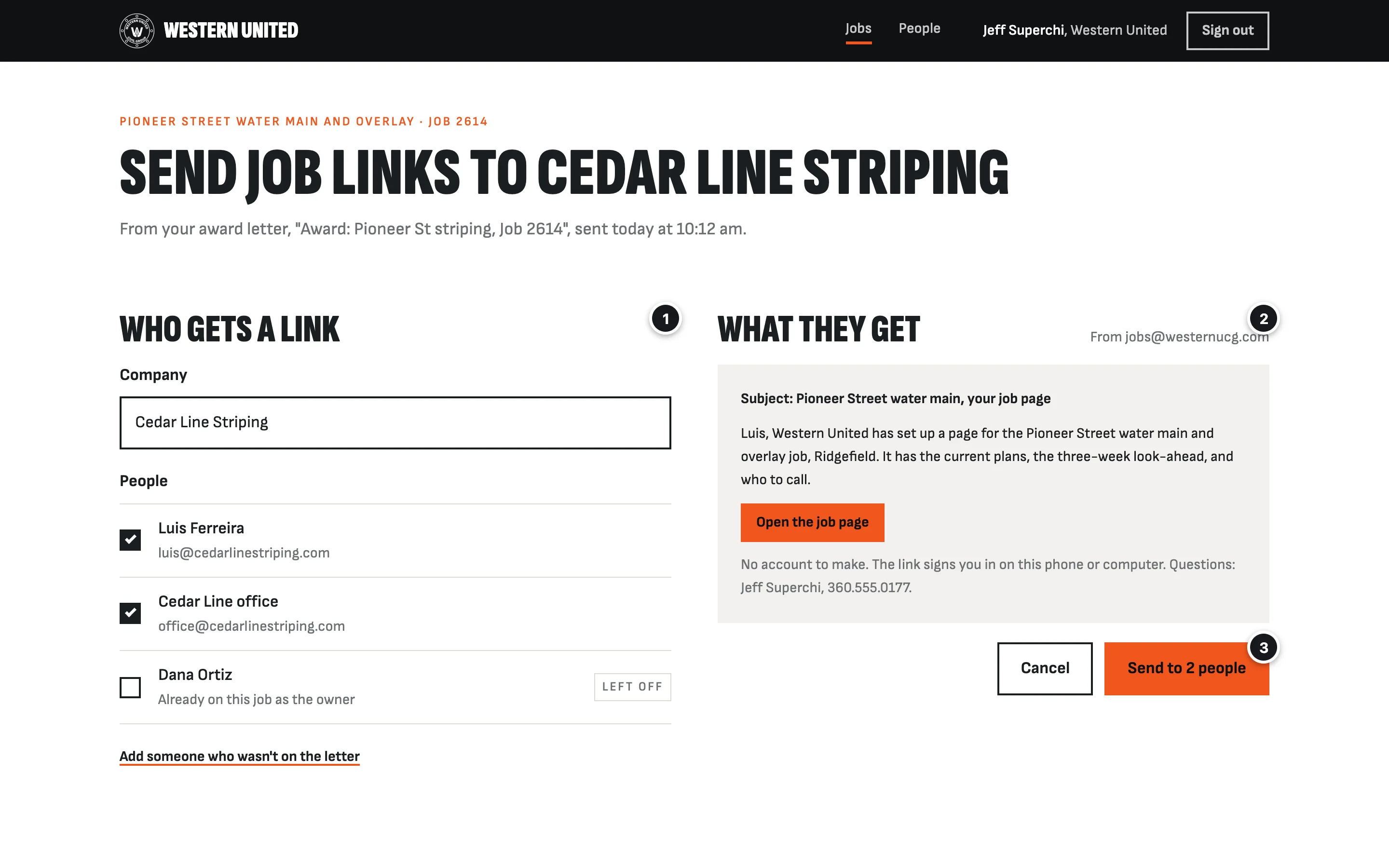
- 1Untick anyone who doesn't belongOr add someone who wasn't on the letter.
- 2What they'll getAn email from Western United with a link to the job page. No account to make.
- 3SendThe only button that sends anything. A PM can also type a sub's email on the job page and send a link by hand.
Only letters sent from a westernucg.com address are read, and the email has to prove it came from your mail server. Anything else sent to a job's address is ignored, so nobody outside can add people to a job.
What an awarded sub sees
The same job, from the striping sub's side. They never see the owner's people or the owner's notes.
Every awarded sub sees everything in the job's current plans folder, not only the sheets for their own work: the whole set, the same as a sub gets on paper today. That way nobody has to sort sheets by trade.
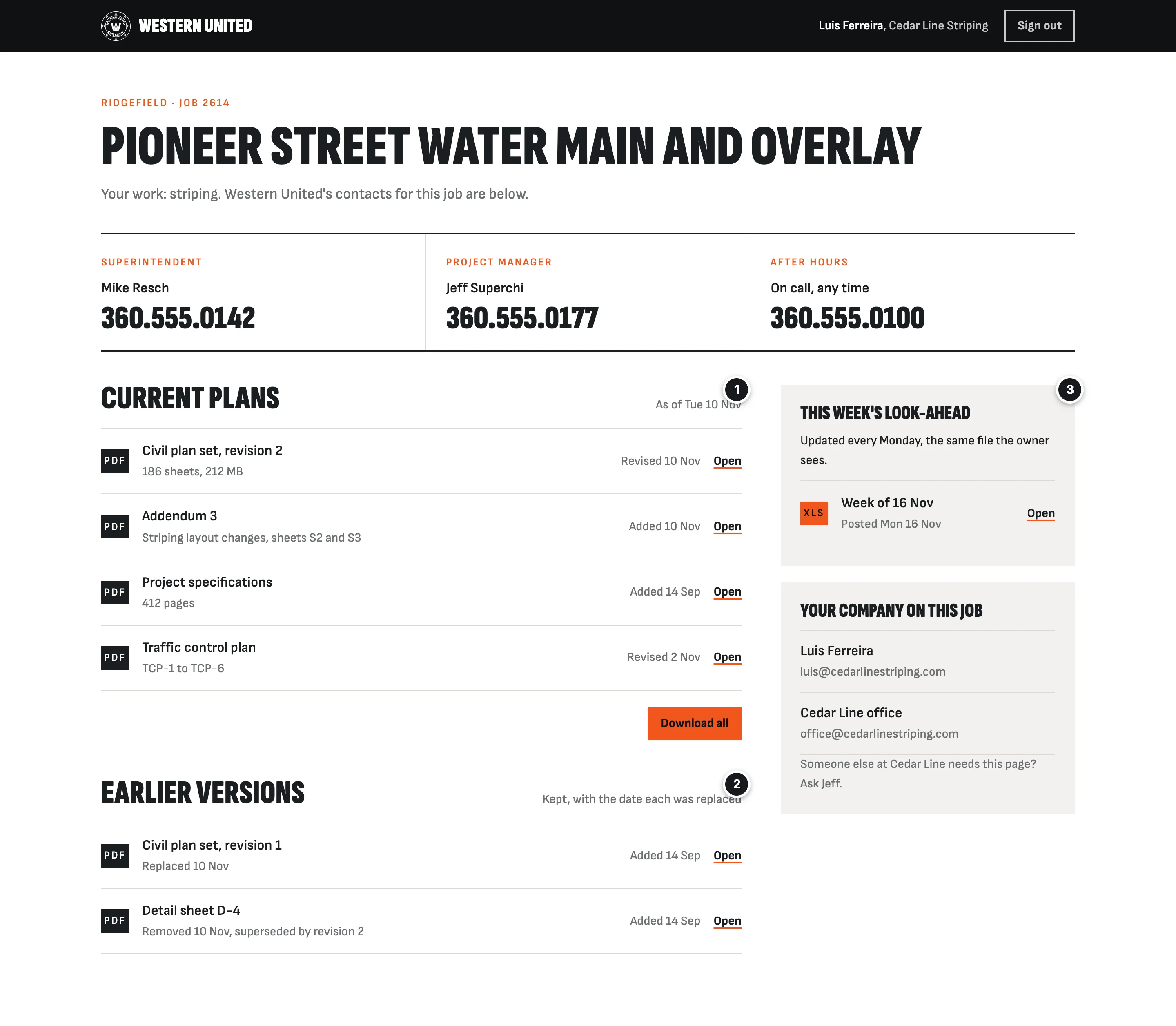
- 1The current plansWhatever is in the job's current plans folder in Dropbox, with the date each was added or revised. Download all at once.
- 2Earlier versionsKept, with the date each was replaced. If a sub built from an old sheet, the page shows what was current and when.
- 3The look-aheadThe same file the owner sees, so a sub knows when their work comes up.
On a phone
Most owners' inspectors and subs' foremen will open it in the field.
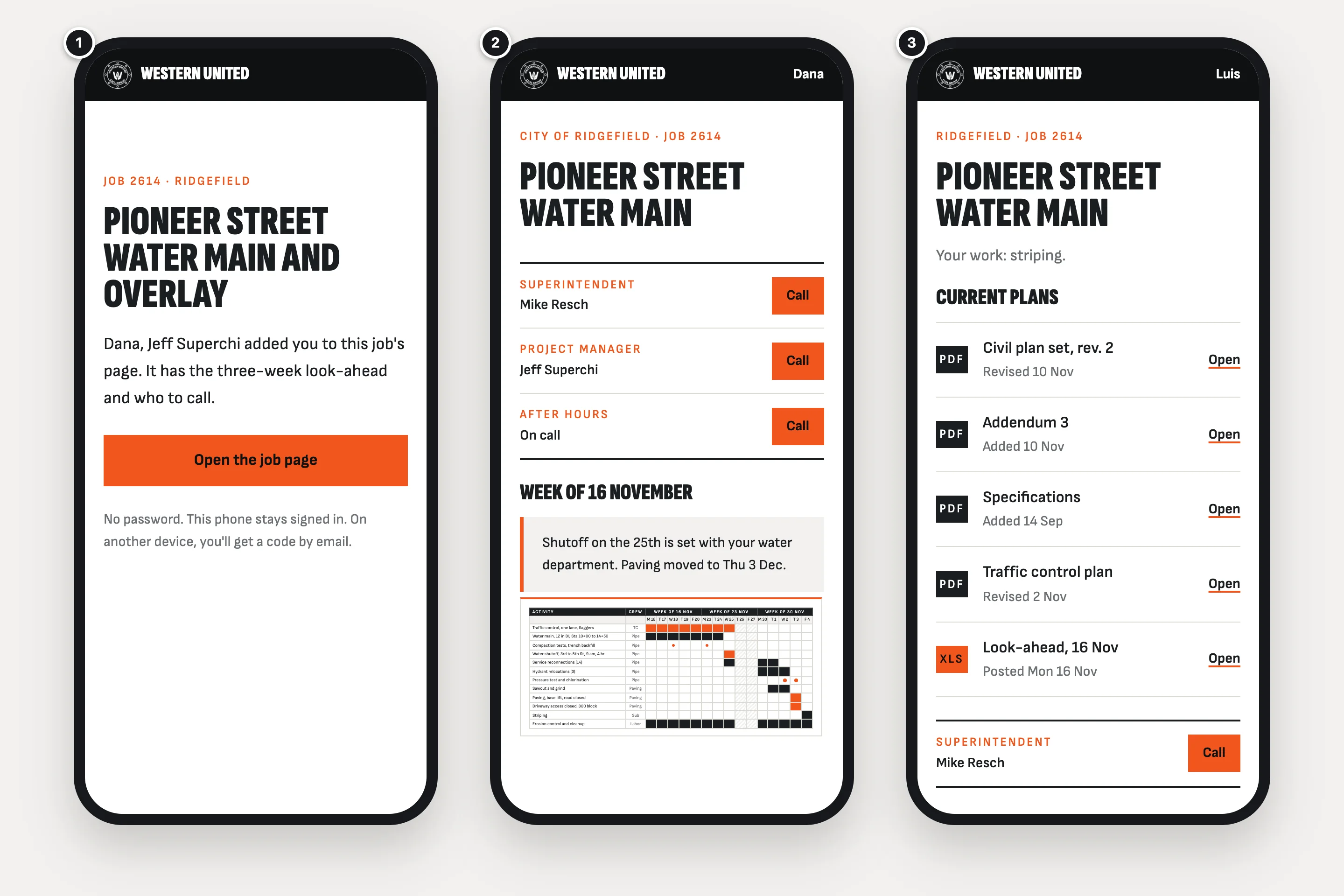
- 1No account to makeThe emailed link opens this, and one tap signs them in. That phone stays signed in. On another device, they get a code by email.
- 2Call from the pageEach number is one tap. The look-ahead opens full size to zoom in.
- 3Plans in the fieldThe current set, by name and date, for a sub's foreman.
Setting up a job
Once per job, by the PM or the office. Nothing is sent to anyone yet.
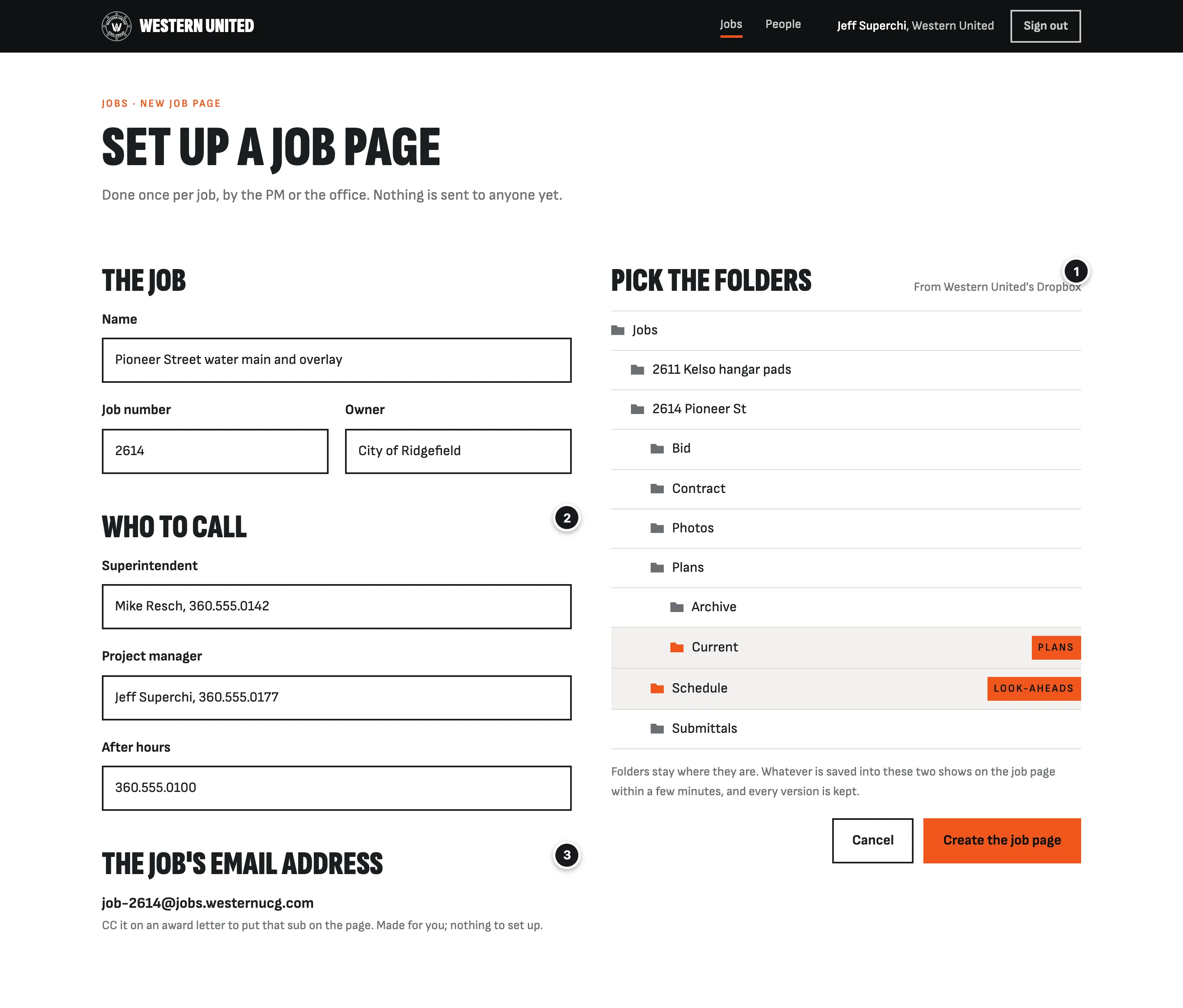
- 1Pick the foldersThe ones the job already has in Dropbox. Anything saved there shows on the job page within minutes; anything removed comes off.
- 2Who to callTyped once, shown to everyone on the job.
- 3The job's email addressMade for you. Nothing to set up.
Part 2
The employee page
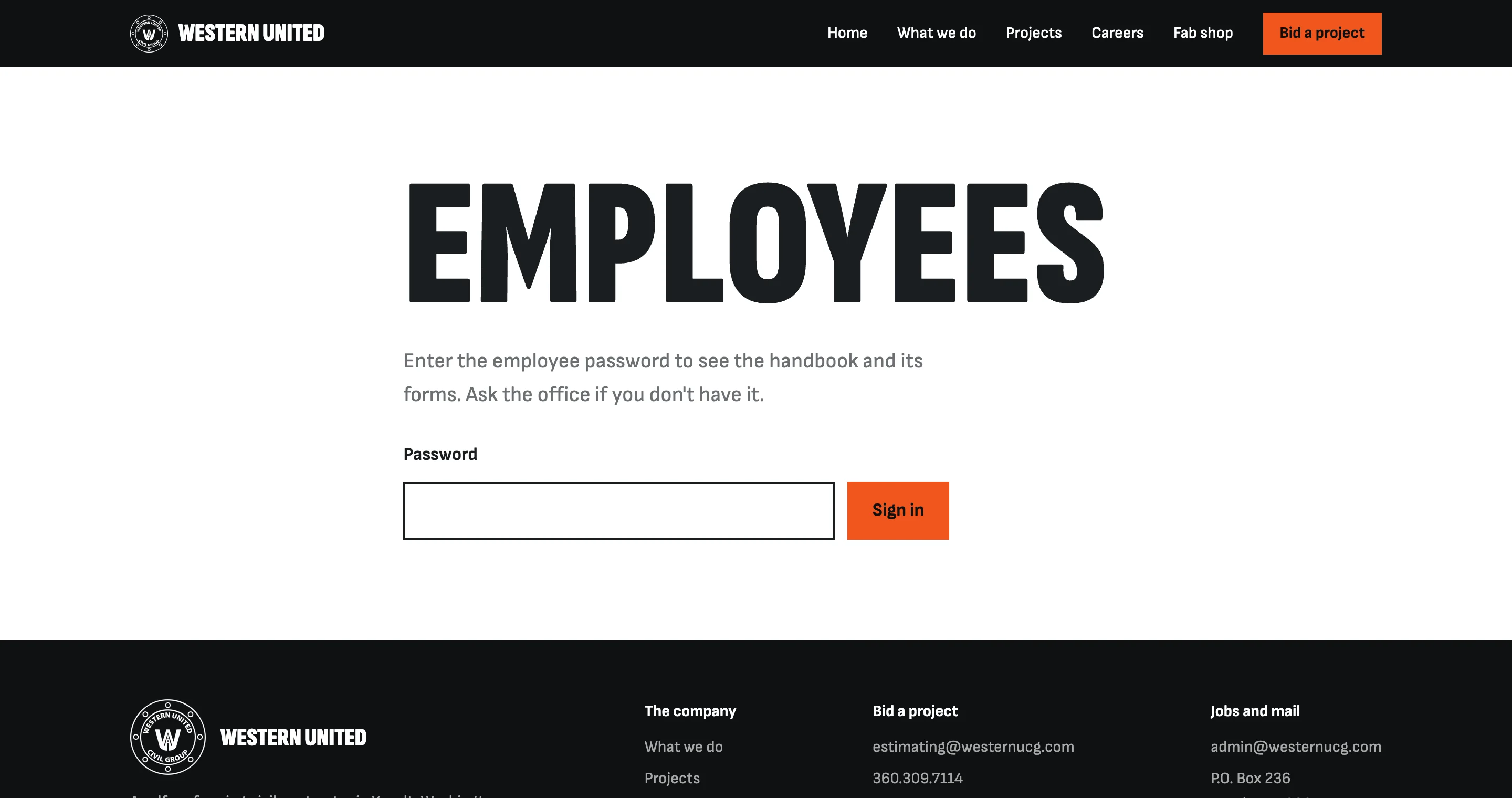
Already built, behind the one shared password. This part fills it in.
Handbook, forms and pay
The sign-in is the real page. The page behind it is a mockup, filled in with what the office sends.
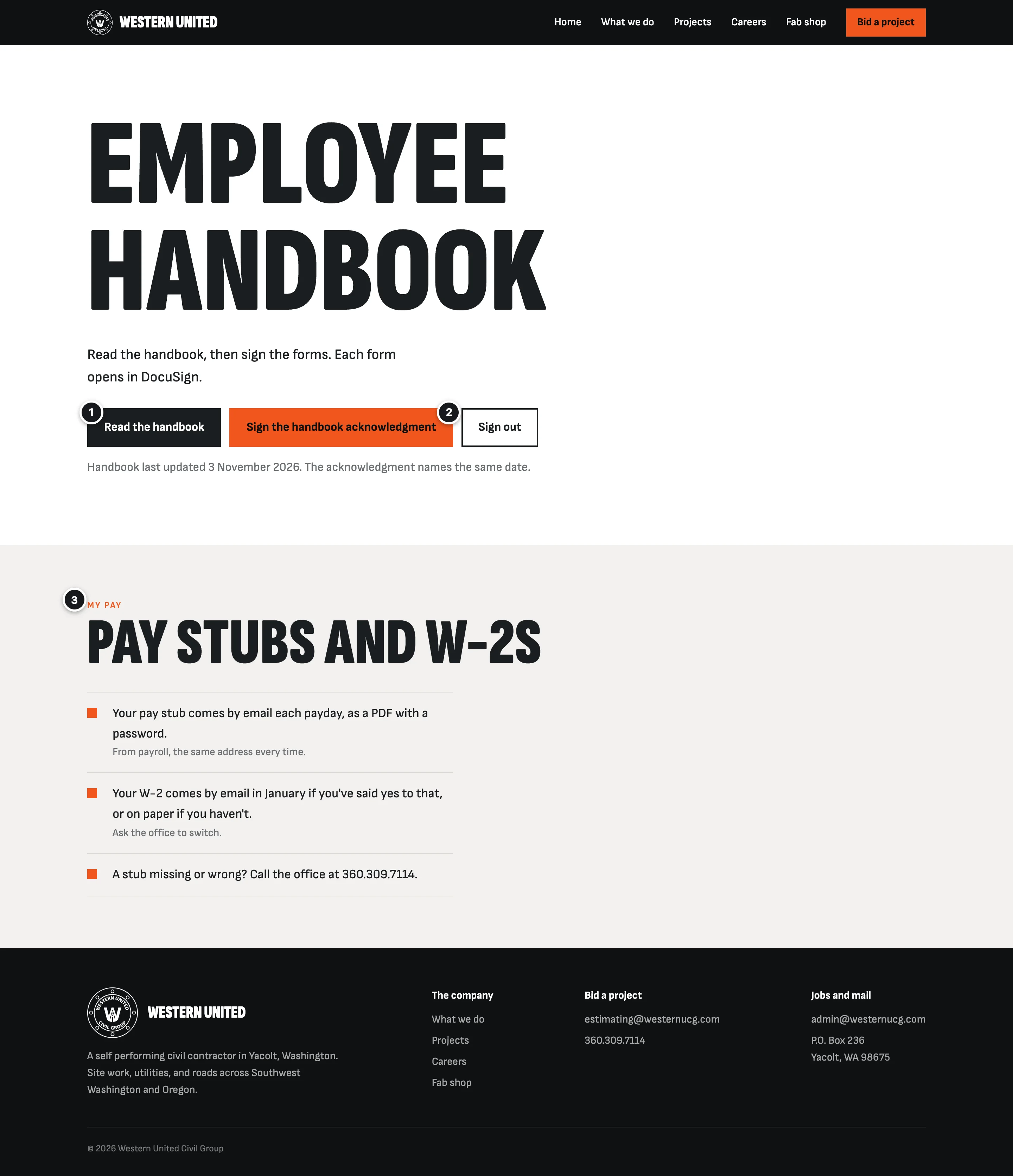
- 1The handbookA link to the handbook in your own Google Drive. HR updates it there, and the website never has to change.
- 2Its DocuSign formsOne button each. The handbook shows the date it was last updated, and the acknowledgment names the same date, so each signature shows which version was read.
- 3Where pay comes fromPay stubs and W-2s stay in Vista, which can email each person their stub. This says where each one comes from and who to ask.
Part 3
How it works
Where things come from, what it costs to run, and what it leaves out.
Where the information comes from
Nothing new to keep up. Your office keeps working in Dropbox and email the way it does now, and the job page follows along.
Dropbox
- Austin's look-aheads, saved where they're saved now
- Each job's current plans folder
The job page only reads the folders picked for it. Nothing in Dropbox moves.
The job page
- A copy of every version of every file it shows
- Who's on each job, and what each may see
- Who opened what, and when
- Every email it sent, to whom
Copies, not links into Dropbox, so the record holds even if a file is later edited or deleted.
- Links to owners and subs, when a PM presses Send
- Sign-in codes, when someone asks for one
- Award letters CC'd to a job, coming in
From a westernucg.com address. Company email stays on Google.
What it costs to run, and who owns it
Everything runs in accounts in Western United's name, the same Cloudflare account as the website, so the business owns its records. The monthly bills go straight to those companies, not through me.
- The job pages: about $5 to $10 a month. Cloudflare's paid plan is $5 a month and covers the hosting, the database and several thousand emails a month. File storage adds cents to a few dollars.
- Sign-in: free. The sign-in screen carries a small "Secured by Clerk" mark, which $25 a month removes, if you'd rather it didn't.
- Dropbox: no change if you're on a business plan (Standard or higher) already.
Not in this version
- Bidding. PreconSuite already does it.
- Emails that go out by themselves whenever a file changes. Once your PMs are using the job pages, the "Plans changed" button in the cost section is the next step, still sent by a person.
- Text messages. Everything goes by email and shows on the page. Texting can come later.
- Logins for each employee, and pay stubs on the site. Pay stays in Vista, so no copy of anyone's Social Security number goes online.
- Safety cards. Keeping them current would fall on the crews, and Vista can already track certifications with expiry dates if that ever becomes a problem.
- Pay applications, change orders and budgets. Those stay in Vista and your contracts.
- A scheduling program. Austin keeps making the look-ahead as now, and the page shows it.
Could you buy this instead?
Part of it, and part of it you have today.
- Dropbox shared links already get files to people for free. But a link can be forwarded to anyone, it doesn't say who opened it, and an owner sees a folder, not a job page with who to call and every earlier week.
- Procore gives owners a login to look-ahead schedules, and it's where PreconSuite sends awarded subs. It's a full project management system, so getting this from it means moving your project work into Procore.
- Emailing the PDF is what owners get from most contractors. It works, but nobody can tell who read it, and last month's version is in someone's inbox.
So the files part you could do with shared links. What's built here is one page per job, in your look, with who looked, every version kept, and subs added by email or straight from an award letter.
Part 4
Next
What I still need to know, what happens next, and the cost.
Questions for you
Beside each is the guess the pictures were drawn on. The first four shape the job pages the most.
The four that shape it most
-
Can Austin send me two or three real look-aheads, as they're made today?A spreadsheet with the same columns every week lets the page work out what changed. A PDF can be shown, but not read.I assumed a spreadsheet saved to the job's Dropbox folder every week.
-
Which job, and which owner's PM, should try it first?A current job, with a PM who'd tell you honestly what's missing.I assumed one public works job, with its owner's PM and inspector and two or three awarded subs.
-
Who sends award letters to subs, and from which email?I assumed the job's PM, from their own westernucg.com address.
-
Which Dropbox plan is Western United on, and does each job have its own folder for current plans and look-aheads?I assumed a business plan, and a folder per job.
The employee page
-
Can the office send the handbook's Google Drive link and the DocuSign link for each form?I assumed one acknowledgment form for now.
-
Do you have Viewpoint HR Management for Vista?It lets employees see their own pay stubs and W-2s on a phone. If you have it, the page links straight to it.I assumed no, and that Vista emails pay stubs.
The business side
-
Is there a date that matters?A job starting, or the slow season.I assumed none yet.
What happens next
- You tick what you'd like in the cost section below and press Text me your picks, or call.
- You send what answers you have, starting with Austin's look-aheads.
- The job pages live at an address of yours, so they go up after the move to westernucg.com.
- Before I build the job pages, I get Dropbox to confirm in writing that copying files from your account this way fits its rules for apps.
- The job pages go on one pilot job first. Once the owner's people and the subs are using them without help, they go on more jobs.
Nothing here is fixed. If a part isn't what you pictured, tell me and we change it. Call or text me at (360) 513-5450.
Cost
Billed by the hour, as usual. Tick what you'd like me to go ahead with. For the job pages and the employee page together I expect about $4,700, hopefully less, with or without the additions.
The job pages and the employee pageBilled by the hour
About $4,700hopefully less
Before sales tax. Bug fixes for 30 days after each part goes live.
The link opens this page with your boxes ticked, so I see exactly what you picked.
Running costs are paid by Western United straight to Cloudflare and the others: about $5 to $10 a month with the job pages. The move to westernucg.com is billed separately.